
Topic 10497
- Icy
- Exile
- Post #1
Topic 10497
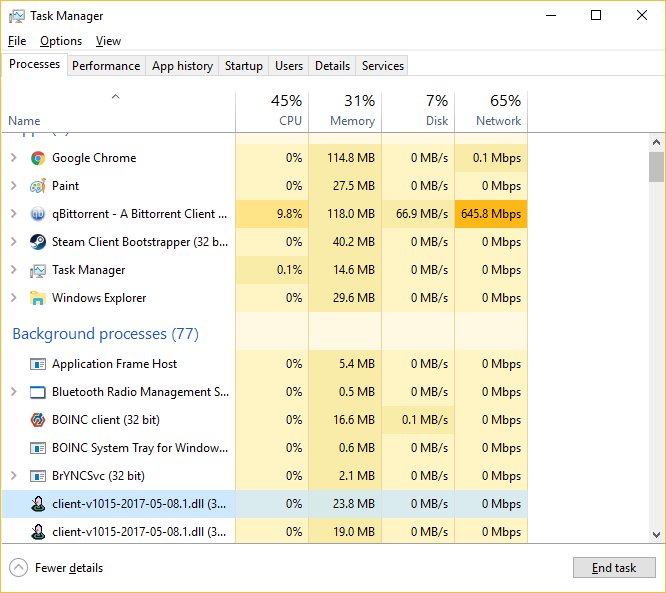
Hoping the client GM can see this...noticing that the Windows client is not ending in Windows 10 Pro Version 1703 (Creators update). I've stopped the client by clicking the X in the top right to close it an hour ago and still see it running as a background process. Please take a look....this is the second machine ive noticed this on. Same Windows version for the other machine.

- Borzon
- Exile
- Post #2
Topic 10497
Ive noticed this as well, also cannot open the client again when it's still running in the background.
- Daimoth
- Exile
- Post #5
Topic 10497
nice humblebrag with the bandwidth, PIRATE.
But yeah, this is happening to me too
- Icy
- Exile
- Post #6
Topic 10497
Just some linux distros manDaimoth wrote:nice humblebrag with the bandwidth, PIRATE.
But yeah, this is happening to me too
- Org du Lac
- Exile
- Post #7
Topic 10497
80 MB/s?
the fastest even possible to get here is 13 MB/s, and I'm in a major city with fiber.
Unless you're running torrents at your workplace, in which case I hope for your job's sake that those are actually Linux distros (and even then...)
- Icy
- Exile
- Post #8
Topic 10497
New one same problem. Running it in compatibility mode for Windows 7 and seeing it occur less.
- Borzon
- Exile
- Post #10
Topic 10497
I think I found a fix, I had a problem with CL not launching due to "Invalid XML file, missing or multiple root tags".
I found a fix online for this that said to locate the application (ClanLord.exe in this case) in the commandprompt and use the command /ResetNavPane
This fixed the error for me and afterwards I didn't notice CL running in the background anymore.
That or it got fixed with an update, I dunno.
I found a fix online for this that said to locate the application (ClanLord.exe in this case) in the commandprompt and use the command /ResetNavPane
This fixed the error for me and afterwards I didn't notice CL running in the background anymore.
That or it got fixed with an update, I dunno.
- Icy
- Exile
- Post #11
Topic 10497
Ill give that a shot but I can assure you still broken for all my clients I just stopped reporting it.
- Icy
- Exile
- Post #12
Topic 10497
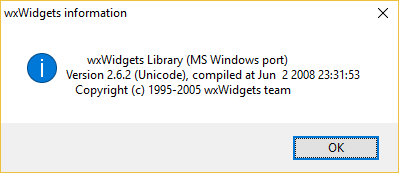
Borzo that didnt work. I tracked it down to likely being a wxWidgets issue. wxWidgets seems to be a bit older, ive noticed on their forums this issue discussed a few times.
https://forums.wxwidgets.org/viewtopic.php?t=27106
https://forums.wxwidgets.org/viewtopic.php?t=26598
ect.
As I said before, dont want to know too much of how CL works right now else I lift the curtain and can never unsee it so I hope this helps team "patch it until it dies" and not team "turn CL into a microtransaction shitshow".

https://forums.wxwidgets.org/viewtopic.php?t=27106
https://forums.wxwidgets.org/viewtopic.php?t=26598
ect.
As I said before, dont want to know too much of how CL works right now else I lift the curtain and can never unsee it so I hope this helps team "patch it until it dies" and not team "turn CL into a microtransaction shitshow".

- Whirl wind
- Exile
- Post #13
Topic 10497
I have this issue as well, however i go into task manager and end Clanlord.exe or the .dll if its the only thing still running if the issue occurs and it resolves the issue for awhile... though I also Crt - Q it or Quit through the dropdown, so maybe thats why im not having the issue as often as opposed to just Xing out.
Not a fix but a way to work with it I guess?
Works for me.
Hope that helps
Not a fix but a way to work with it I guess?
Works for me.
Hope that helps
- Whirl wind
- Exile
- Post #15
Topic 10497
Is anyone else having an issue with .dll file deletion upon exiting CL? Every time I quit, regardless of how, it deletes the client .dll file basically making it unplayable unless I re extract CL completely.
Update:
I ended up finding what is hopefully a solution to this if people are having this issue.
Turns out Windows Defender in win10 is particularly aggressive and I had to add an exception to files with .dll extension and for good measure removed clanlord folders from being scanned from my antivirus.
Damn anti-virus
Update:
I ended up finding what is hopefully a solution to this if people are having this issue.
Turns out Windows Defender in win10 is particularly aggressive and I had to add an exception to files with .dll extension and for good measure removed clanlord folders from being scanned from my antivirus.
Damn anti-virus